Introduction to AWS Security
-
Introduction
About the course and authors -
AWS cloud architecture
-
Security concerns with our architecture
-
Regions and Availability Zones (AZs)
-
Shared responsibility in the cloud
-
[Cheat Sheet] AWS Security Services
-
Create a billing alert to avoid surprise bills
-
Infrastructure SecurityVPC networks
-
Default VPCs
-
[DEMO] Creating VPCs and Subnets
-
How many VPCs should you use?
-
[DEMO] Subnet, Route Table, and Gateway Configurations
-
[LAB] [Challenge] Create a VPC with public and private subnets
-
[LAB] Launching an EC2 instance
-
[DEMO] Security Groups (SGs)
-
Security Groups Best Practices
-
[DEMO] Network Access Control Lists (NACLs)
-
[Cheat Sheet] SGs vs. NACLs
-
[LAB] [Challenge] Configure security groups and NACLs to specific requirements
-
Elastic Load Balancers
-
[DEMO] AWS WAF
-
[LAB] [Challenge] Deploy AWS WAF ACL for Application Load Balancer
-
[DEMO] AWS Network Firewall - Part 1
-
[DEMO] AWS Network Firewall - Part 2
-
AWS Shield for DDoS Protection
-
[LAB] Reduce AWS attack surface with port scanning and Security Groups
-
AWS Firewall Manager
-
Identity and Access Management (IAM)Key Concepts of IAM in AWS
-
[DEMO] Getting started with IAM in AWS
-
[DEMO] Creating our first admin user
-
Assigning permissions with policies
-
[Cheat Sheet] Anatomy of an AWS IAM Policy
-
[DEMO] Using Identity Center AWS SSO
-
IAM Roles
-
[DEMO] Creating a role for EC2 instances to access S3 buckets
-
End-User Management with Amazon Cognito
-
IAM Access Analyzer
-
[DEMO] IAM Access Analyzer Unused Access
-
[LAB] Check policies for new access before deployment with IAM Access Analyzer
-
[LAB] Check IAM policies against a deny list with IAM Access Analyzer
-
[LAB] IAM Credentials Report
-
Data ProtectionData protection in the cloud
-
EBS Data Protection and Encryption
-
[LAB] Encrypt Existing Unencrypted EBS Volumes and Snapshots
-
Amazon RDS Data Protection and Encryption
-
Key Management with AWS KMS
-
[Cheat Sheet] Getting Started with AWS KMS
-
[DEMO] Creating a Symmetric Encryption KMS Key
-
[Cheat Sheet] Encrypt and Decrypt Data with KMS and Data Keys
-
[LAB] Encrypt and Decrypt Data with KMS and Data Keys
-
Amazon S3 Bucket ProtectionUnderstanding Bucket Ownership
-
[LAB] Creating Buckets and Uploading Objects in S3
-
Managing Access to Buckets
-
[Cheat Sheet] S3 Bucket Policies vs. ACLs vs. IAM Policies
-
[LAB] [Challenge] Create an IAM role for secure access to S3 based on a scenario
-
Using Signed URLs
-
[LAB] S3 Presigned URLs
-
Encrypting S3 Data
-
[DEMO] Enable S3 Object Versioning
-
[Cheat Sheet] Amazon S3 Protection Summary
-
[Cheat Sheet] Create a least privilege S3 bucket policy
-
AWS Log Types and Auditing Options
-
Logging, Monitoring, and Incident Response[DEMO] Enable S3 Server Access Logs
-
AWS CloudTrail
-
Amazon CloudWatch
-
[DEMO] CloudTrail Security Automation with CloudWatch Logs and SNS
-
[LAB] Amazon VPC Flow Logs
-
Proper Logging and Monitoring
-
Amazon GuardDuty
-
[LAB] [DEMO] Enable Threat Detection with GuardDuty
-
[DEMO] Amazon EventBridge
-
AWS Config
-
AWS Systems Manager
-
[LAB] Secure EC2 Access with SSM Session Manager and KMS
-
[DEMO] AWS Config Automated Remediation with SSM
-
[LAB] Automated S3 Remediation to Enforce Block Public Access
-
[LAB] Remediate Open SSH Security Groups with AWS Config and SSM
-
Amazon Detective
-
[DEMO] Amazon Inspector
-
[LAB] Find vulnerable Lambda Functions with Amazon Inspector
-
About Amazon Macie
-
[DEMO] Deploying Amazon Macie
-
[DEMO] AWS Security Hub CSPM
-
[DEMO] Must-have AWS monitoring and alerting with SSK
-
[DEMO] AWS Organizations
-
Multi-Account Security[DEMO] Centrally managing root access
-
[DEMO] AWS SCPs and Management Policies
-
[DEMO] Resource Control Policies (RCPs)
-
AWS Control Tower
-
[DEMO] Using RAM to share resources across accounts
-
About IaC
-
Infrastructure as Code (IaC)[DEMO] Deploying resources with CloudFormation
-
[DEMO] Deploying a Lambda function with CloudFormation
-
[DEMO] Multi-account and multi-region deployments
-
[DEMO] Detecting drift
-
[LAB] CloudFormation Guard
-
[DEMO] Using AWS Service Catalog - Part 1
-
[DEMO] Using AWS Service Catalog - Part 2
-
[DEMO] Getting started with the Cloud Development Kit (CDK)
-
[DEMO] Deploying a project with the CDK
-
Wrap-up and Key TakeawaysWhat next?
Access the interactive diagram for this lesson here. (It may ask you to create a free account in order to view. You do not need paid features to view this course’s content so you can ignore that!)
Regions and Zones
One of the key points we haven’t discussed yet is how many of the resources we can deploy in AWS need to be deployed in a specific region.
You see, the cloud is simply someone else’s computers. Those computers are physical pieces of equipment that have to reside somewhere.
That somewhere can, in large part, be decided by the customer — you.
The way you do that is by selecting an AWS Region.
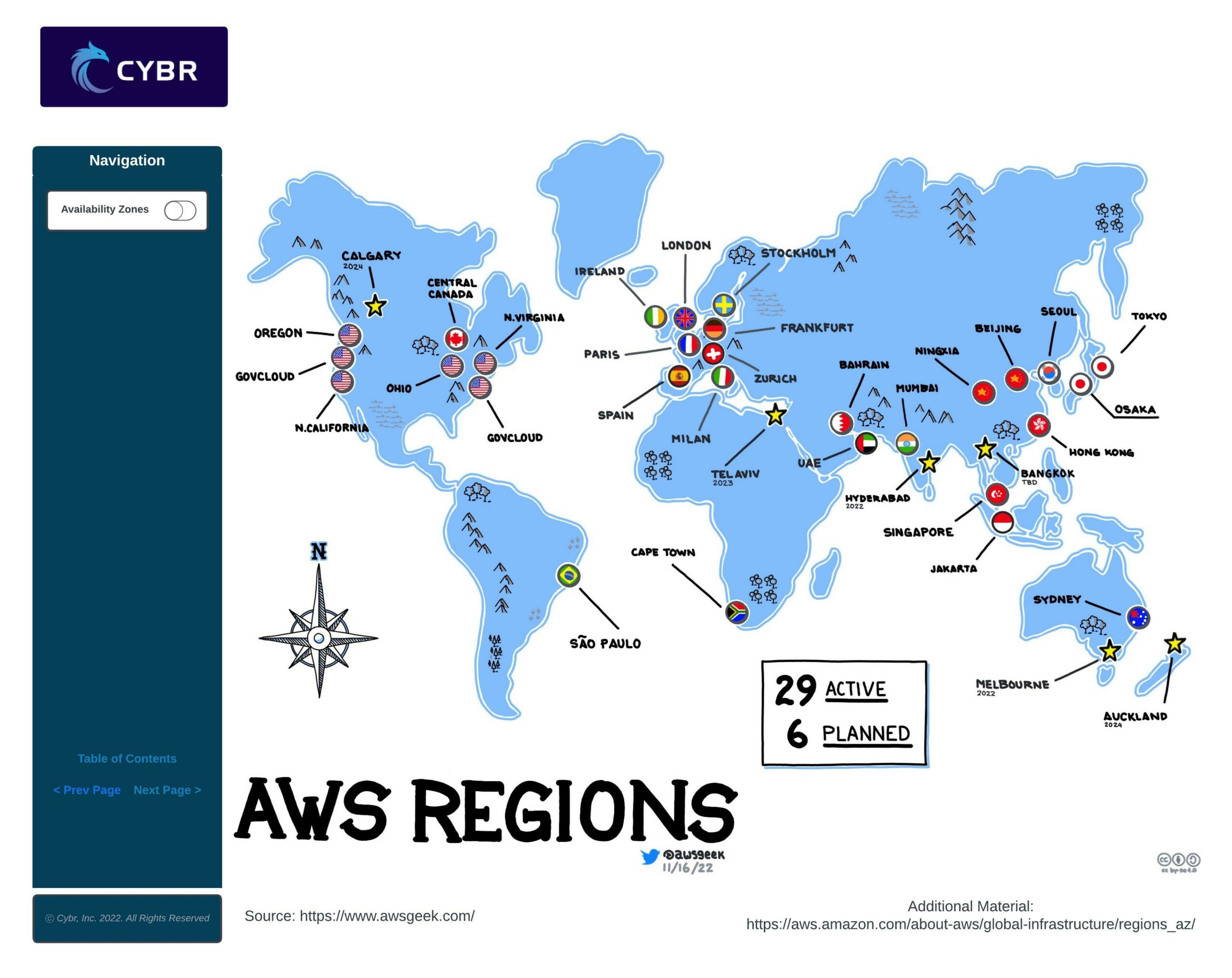
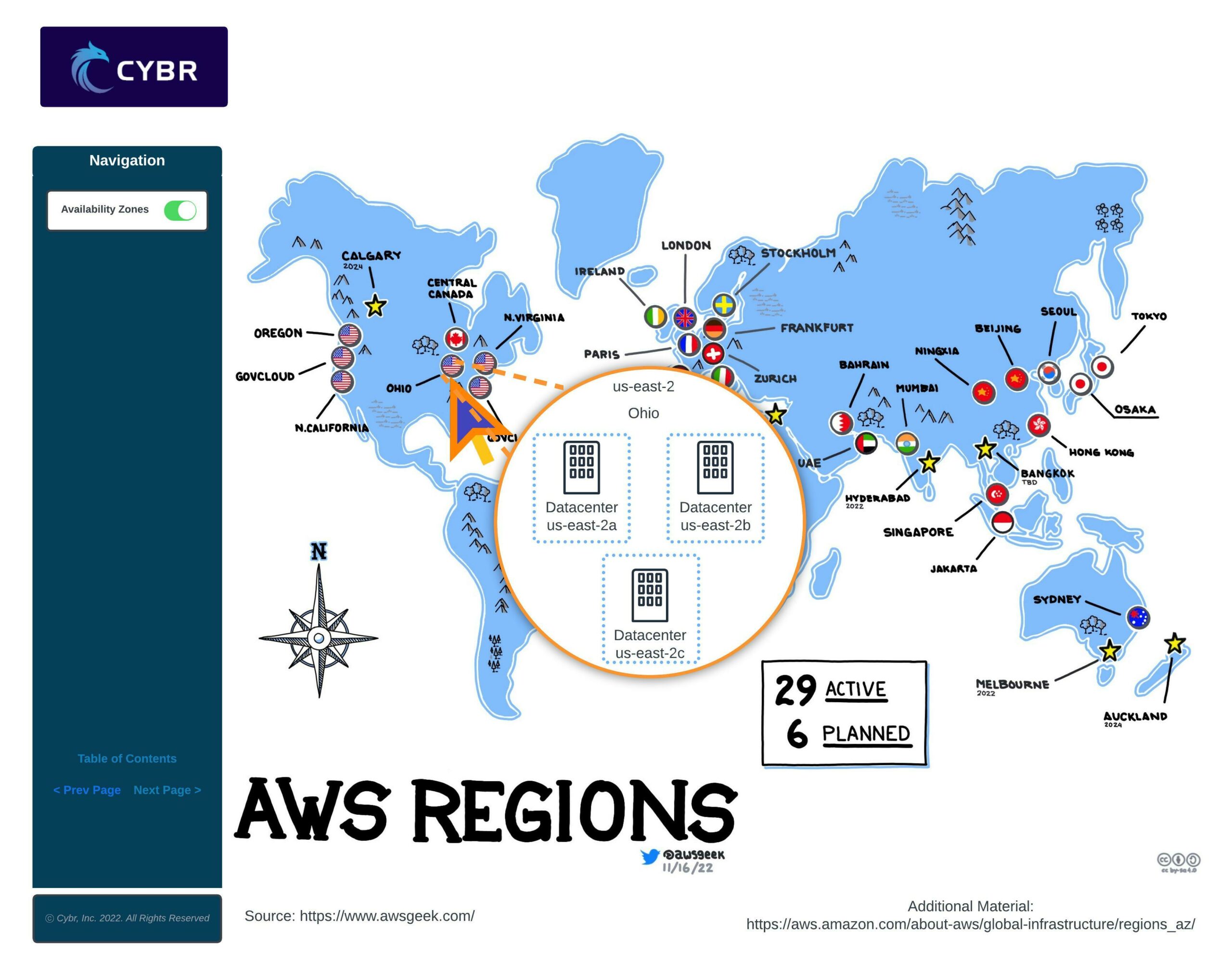
The AWS infrastructure is distributed in locations all around the world. Amazon divides the world into Regions which are physical locations with AWS data centers. In each region, Amazon operates multiple, isolated, and physically separate availability zones. An Availability Zone consists of one or more discrete data centers, with redundant power, networking, and connectivity.
Choosing a region
When you start building your AWS infrastructure, you must select the region in which you will be deploying your resources.
You need to weigh in several parameters in order to choose the right region for you.
Legal and Regulatory Compliance
First of all, legal and regulatory compliance is an important factor that you need to consider. Many compliance frameworks, especially those dealing with the protection of personal data, have data residency requirements.
For example, if you’re processing or storing personal information of EU citizens, you need to comply with GDPR, the European General Data Protection Regulation. GDPR requires that you either keep personal data of EU citizens within the EU, or that you inform the citizen that you are transferring their data outside of the EU and that you implement additional security controls.
All of this means that you may want to choose a region according to data residency requirements.

Performance, Availability, and Cost
Second of all, another important aspect to consider is latency. It makes sense to choose a region with close proximity to the location of your user base to minimize latency.
Cost and service availability are two other factors worth taking into account. Some AWS services are priced differently from one region to another. Also, sometimes, newer services and features are deployed to regions gradually, which means that they may not be available to some of those regions for quite some time.
Availability Zones
As we mentioned a moment ago, each region has Availability Zones, or AZs.
An AZ is one or more data centers with redundant power, networking, and connectivity within that AWS Region.
When using AWS services, sometimes they are automatically deployed across AZs, while other times you have to manually select which AZ to deploy the resource into, and whether you want to deploy the services across multiple AZs or not.
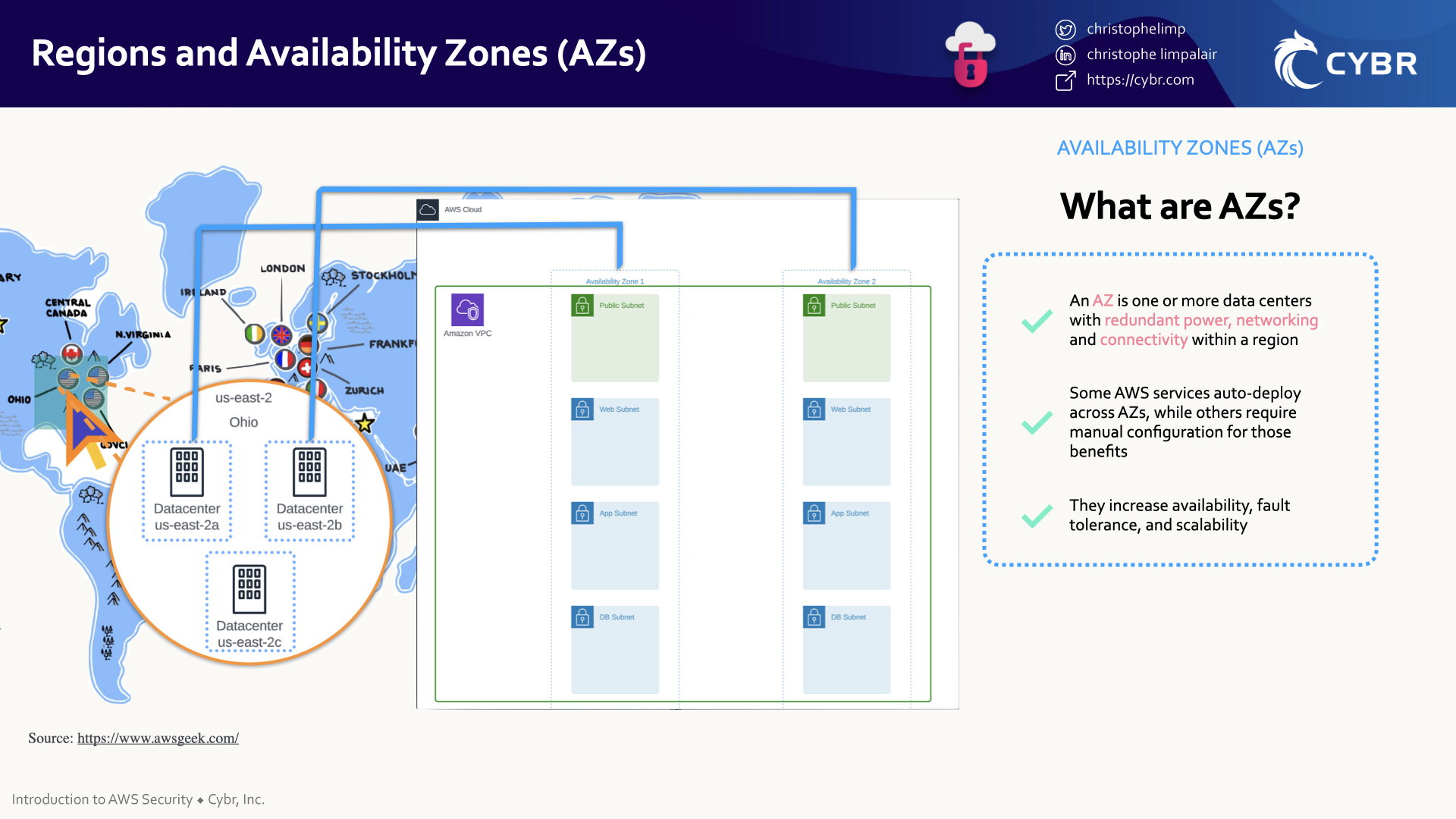
The reason to use more than one AZ is to increase availability, fault tolerance, and scalability of your services.
If we look back to our Cloud Architecture Diagram, we can see that we have subnets deployed into two different AZs. We are then deploying duplicate instances across those AZs, as well as a database replica.
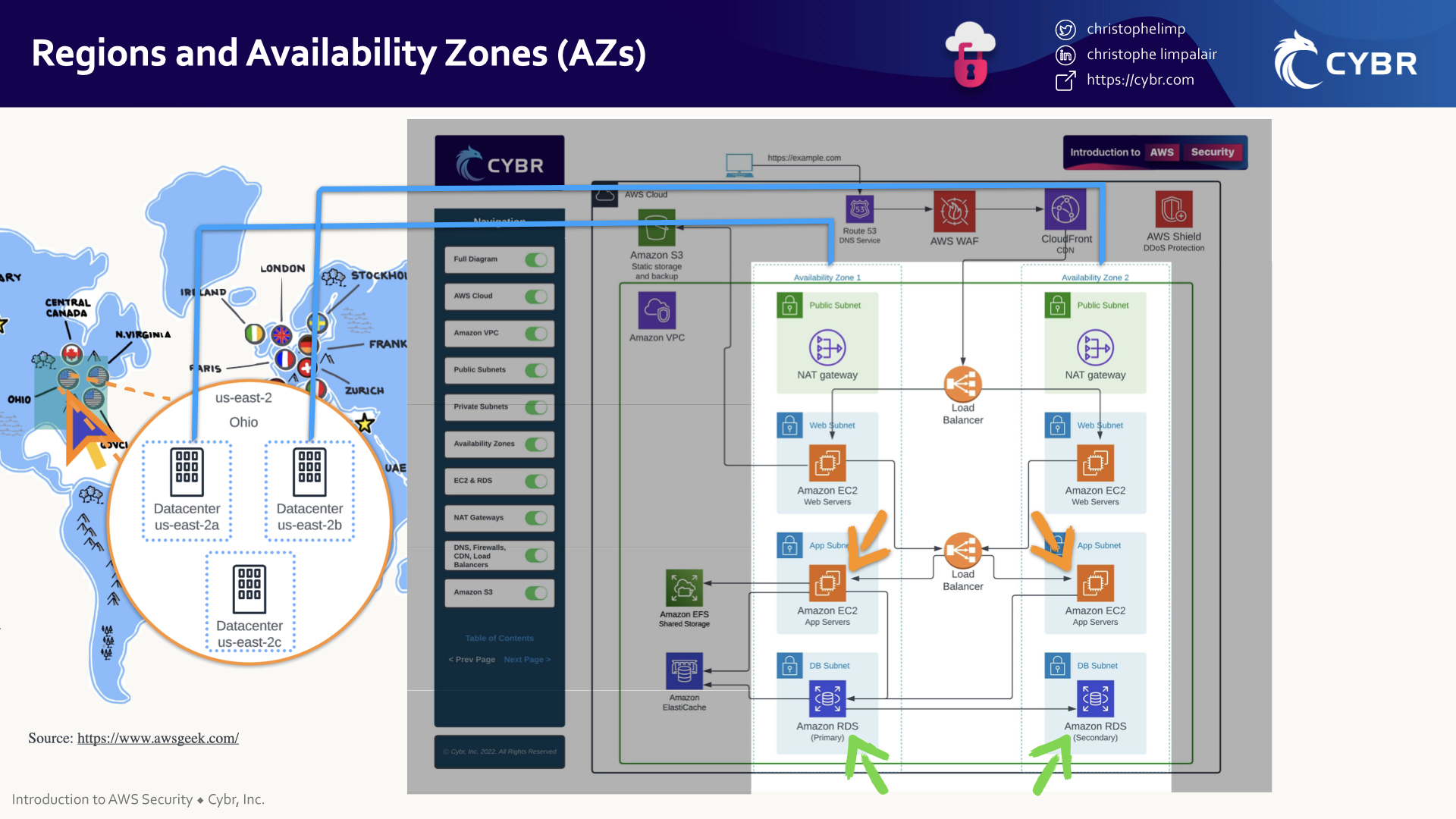
That way, if something happens to one of those AZs, like if there’s a natural disaster, a human error, or even a terrorist attack, it’s unlikely to cause the entire region to go down and instead would hopefully only affect one of those AZs.
If that’s the case, then our application can continue functioning as normal because we still have that secondary AZ.
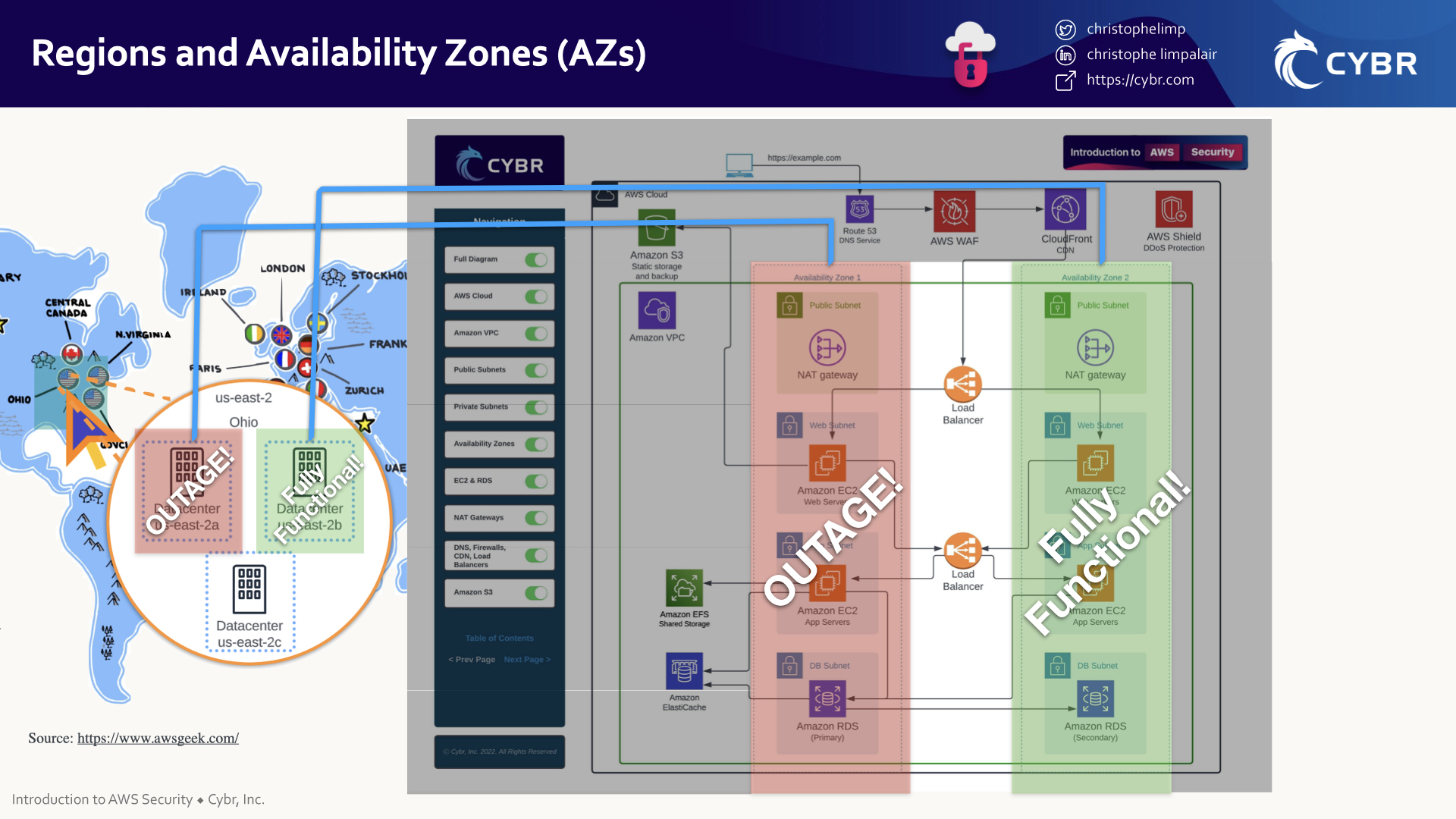
That makes AZs a very valuable feature for business continuity.
Conclusion
That’s it for now in terms of talking about regions and zones…next, we need to talk about one more key aspect of cloud security: understanding shared responsibility.
Go ahead and complete this lesson, and I’ll see you in the next!
Great Platform I’m so Happy!
Glad you’re enjoying it so far!!